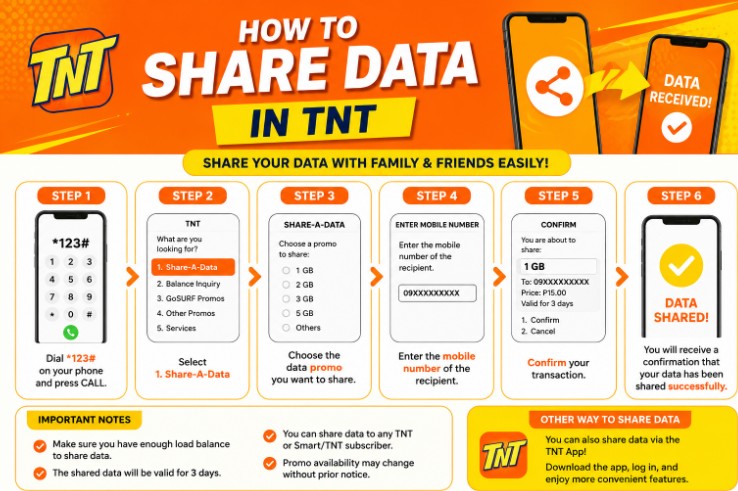
TNT users often need to share mobile data with friends, family members, classmates, or backup devices. Whether someone runs out of internet during an important task or simply needs emergency access online, TNT offers easy ways to transfer or share data using promos and built-in network features.
Many TNT subscribers are unaware that data sharing methods can vary depending on the promo, app, and current TNT services available. Some promos allow direct data sharing, while others support pasaload credits that can be used to register internet packages.
This guide explains how to share data in TNT, available methods, important requirements, promo compatibility, troubleshooting tips, and everything else you need to know.
Can You Share Data in TNT?
Yes, TNT users can share data using selected TNT and Smart services. Depending on the available feature or promo, users may:
- Share mobile data directly
- Transfer load through Pasaload
- Share hotspot internet
- Send promo subscriptions
- Use app-based sharing options
The available option may depend on your active promo and account eligibility.
Different Ways to Share Data in TNT
TNT subscribers usually use these methods:
- Mobile hotspot sharing
- TNT Pasaload
- Promo sharing
- Smart App features
- Family or group data sharing offers
Each method works differently.
Method 1: Share Data Using Mobile Hotspot
The easiest way to share internet on TNT is through the hotspot feature available on smartphones.
This method allows another device to connect to your TNT mobile data.
How to Enable Hotspot on Android
Follow these steps:
- Open Settings
- Tap Network & Internet
- Select Hotspot & Tethering
- Turn on Wi-Fi Hotspot
- Set a hotspot name and password
- Connect another device
Once connected, the other device can use your TNT mobile data.
How to Enable Hotspot on iPhone
Follow these steps:
- Open Settings
- Tap Personal Hotspot
- Enable Allow Others to Join
- Create a Wi-Fi password
- Connect another device
Your TNT internet can now be shared.
Advantages of Hotspot Sharing
Hotspot sharing is popular because:
- No extra registration is required
- Works instantly
- Compatible with most TNT promos
- Can connect multiple devices
- Useful for laptops and tablets
Important Reminder About Hotspot Usage
Some TNT promos may have:
- Hotspot restrictions
- Speed limitations
- Fair usage policies
- Data caps
Heavy hotspot use can consume data quickly.
Method 2: Share Data Through TNT Pasaload
TNT Pasaload allows users to send load credits to another TNT or Smart subscriber.
The receiver can then use the load to register their own internet promo.
How to Pasaload in TNT
Use this format:
PASALOAD <space> MobileNumber <space> Amount
Send it to:
808
Example:
PASALOAD 09123456789 20
This sends ₱20 load to the selected number.
TNT Pasaload Requirements
Before sending load, ensure:
- You have enough balance
- Your SIM is active
- The recipient uses TNT or Smart
- The amount meets minimum transfer limits
Service fees may apply.
Minimum and Maximum Pasaload Amount
Limits may vary, but TNT commonly allows:
- Minimum: ₱2
- Maximum: Depends on account balance and promo rules
Always check the latest TNT policy.
Method 3: Share Internet Through Promo Registration
Some TNT promos allow users to register another TNT number to a promo package.
Instead of transferring raw data, you directly subscribe another person to a data promo.
How Promo Sharing Works
You:
- Pay for the promo
- Register another TNT number
- The recipient receives the internet allocation
This method is useful for:
- Family members
- Students
- Backup phones
- Emergency internet access
Using the Smart App for TNT Data Management
The Smart App can help TNT users manage:
- Data balance
- Promo registration
- Load purchases
- Promo sharing
- Account monitoring
Steps to Use the Smart App
- Download the Smart App
- Log in using your TNT number
- Verify using OTP
- Access promos and services
- Check available sharing options
The app interface may change depending on updates.
How to Check TNT Data Balance
Before sharing internet, check your remaining data balance.
Option 1: Using the Smart App
Open the app to see:
- Remaining GB
- Promo validity
- Expiration date
Option 2: Using SMS or USSD
Some promos support balance checking through:
- Text commands
- Dial codes
Available commands may differ by promo.
Why TNT Users Share Data
Data sharing is useful for many situations.
Common reasons include:
- Online classes
- Remote work
- Emergency internet needs
- Video streaming
- Gaming access
- Travel backup connection
- Family sharing
Hotspot and promo sharing are especially common among students and heavy internet users.
Common Problems When Sharing TNT Data
Some users experience issues while sharing internet.
Hotspot Not Working
Possible causes:
- Mobile data disabled
- Incorrect hotspot password
- Device compatibility issue
- Promo hotspot restriction
Restarting the device may help.
Slow Internet Connection
Speed may slow down because of:
- Weak signal
- Network congestion
- Multiple connected devices
- Fair usage limits
Pasaload Failed
Possible reasons include:
- Insufficient balance
- Wrong mobile number
- Network issue
- Service temporarily unavailable
Double-check all details before retrying.
TNT Data Sharing Tips
Here are useful tips for smoother sharing:
- Use strong hotspot passwords
- Monitor data usage regularly
- Avoid connecting too many devices
- Use 4G or 5G coverage areas
- Keep your phone charged
- Register larger data promos for sharing
- Disconnect unused devices
Best TNT Promos for Data Sharing
Some TNT promos work better for hotspot and sharing.
Users often prefer:
- Unli Data promos
- All-data promos
- 5G promos
- Longer validity promos
Larger data allocations are ideal for families or multiple devices.
Is TNT Data Sharing Free?
Hotspot sharing itself is usually free.
However:
- Your promo data gets consumed
- Pasaload may include service fees
- Some promo registrations require payment
Always review promo terms and conditions.
Can You Share Unlimited Data in TNT?
Some TNT unlimited promos support hotspot usage, while others may limit tethering.
Availability depends on:
- Promo type
- Network policy
- Device compatibility
Always check promo inclusions before relying on unlimited sharing.
TNT 5G Data Sharing
Users with 5G-compatible phones can share faster internet through hotspot.
Requirements include:
- 5G-compatible smartphone
- TNT 5G promo
- 5G coverage area
5G hotspot sharing can provide faster speeds for laptops, tablets, and smart devices.
Safety Tips When Sharing Mobile Data
Protect your connection by following these tips:
- Never share hotspot passwords publicly
- Change passwords regularly
- Disconnect unknown devices
- Monitor connected users
- Avoid sensitive transactions on public sharing
Keeping your hotspot secure prevents unauthorized usage.
Frequently Asked Questions
Can TNT users share data directly?
Some TNT services support data sharing, while hotspot and Pasaload remain the most common methods.
Does hotspot consume more data?
Hotspot itself does not consume extra data, but connected devices may use large amounts of internet.
Can I share data from TNT to Smart?
Pasaload and some services work between TNT and Smart numbers.
Is there a limit to hotspot sharing?
The limit depends on your phone, promo, and data allocation.
Can I use hotspot with TNT Unli Data?
Some TNT unlimited promos allow hotspot access, but restrictions may apply.
Final Thoughts
Sharing data in TNT is simple and useful for everyday internet needs. Whether you use mobile hotspot, Pasaload, or promo registration, TNT provides several convenient options to help users stay connected.
For most users, hotspot sharing remains the fastest and easiest solution because it works instantly with smartphones, tablets, and laptops. Meanwhile, Pasaload is ideal for sending load credits so another user can register their own internet promo.
Before sharing data, always check your promo inclusions, remaining balance, and hotspot compatibility to avoid interruptions. Using the right TNT promo can also improve sharing speed, stability, and overall internet experience.